Totals pane
The totals pane appears when you select event totals to view. The totals pane is located in the center of the scheduler window. Each value represents the total number of employees scheduled for an event. (See the following figure.)
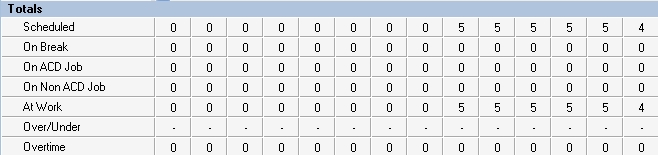
You can view the following event totals:
Forecasted
The Forecasted total displays after you apply a forecast to the schedule. This total represents the forecasted number of employees required to handle interaction requests and meet the Service Level objectives you specify. You can optionally adjust the Forecasted total in the totals pane. See "Modifying forecast totals in the event totals pane".
When the user sets View to greater than 6 hours, each cell value in the Totals View is the maximum value of the composite 15-minute values. The Over/Under value displayed is also the maximum of the composite values. As a result, in this view, the displayed value for the Over/Under does not align with the value that would be obtained from adding the At Work and forecasted values.
Scheduled
The Scheduled total represents the number of employees scheduled for the time you are viewing.
On break
The On break total represents the number of employees scheduled for a break at a specific time.
On ACD Job
The On ACD Job total represents the number of employees scheduled to perform ACD work.
On Non ACD Job
The On Non ACD Job total represents the number of employees scheduled to perform Non ACD work.
At work
The At work total represents the number of employees scheduled to handle interaction requests.
Over/Under
The Over/Under total represents the difference between the number of employees at work compared to the number of employees forecasted. A value of 4 means 4 additional employees are working compared to the forecasted requirement. A value of (4) means 4 fewer employees are working compared to the forecasted requirement. When you book annual leave for employees, you can preview the result on shift coverage by using the over / under function, before updating changes.
Overtime
The Overtime total represents the number of employees scheduled to perform overtime work.